Feb 20, 2026
·Max Meyer

Buying tickets for the 2026 World Cup can feel confusing at first. Instead of zooming in on a specific section and row like you would for a concert or a club match, you’re asked to choose a seat category and trust that your exact spot will be assigned later.
This explainer breaks down what each category (1–4) really looks like inside a World Cup stadium, why your seat number stays hidden until closer to kickoff and how SeatGeek helps you make smart choices even when you’re buying “by category” instead of by row. For a visual walkthrough on this topic, make sure to check out SeatGeek’s 2026 World Cup seating guide video on YouTube.
Explaining the four World Cup 2026 ticket categories
FIFA organizes most public tickets into four main seat categories based on how close you are to the pitch and what your viewing angle looks like. Accessible and hospitality options sit outside this structure, but for general tickets, you’ll mostly see Category 1, 2, 3 and 4.
On SeatGeek, every World Cup ticket clearly lists its category, so you can compare options across matches and cities at a glance.
Category 1: Premium midfield and lower‑bowl views
Category 1 is the top viewing tier in the stadium. These seats are typically closest to the pitch, especially along the sidelines, and are often in the lower bowl or other prime lower‑level spots. If you imagine the “TV camera” angle you see during broadcasts, Category 1 is built to feel a lot like that—great for following every run, pass and switch of play. Exact rows and sections can vary by stadium, but if you’re prioritizing view over price, this is where you start.
Category 2: Strong sidelines and corner views
Category 2 sits just outside the Category 1 “sweet spot.” You’ll usually find a mix of lower‑level corner seats and more elevated sideline views. You’re still getting a clear look at the full pitch, just from a slightly more angled or higher perspective. For many fans, Category 2 is the sweet spot on value: better views than the very top of the stadium, without paying Category 1 prices.
Category 3: Upper corners and behind‑the‑goal
Category 3 is where you start to feel more height and more behind‑the‑goal locations. These seats are typically higher up and often live behind the nets or in the upper corners. The trade‑off is distance for a broader, tactical view—great if you like seeing the full shape of the match develop. For a lot of traveling fans, Category 3 is the “I want to be in the stadium, soak up the atmosphere and keep my budget in check” choice.
Category 4: Most budget‑friendly, higher‑up views
Category 4 is the most budget‑friendly way into any World Cup match from group stage to the final. These seats are usually higher in the upper tier and closer to the corners or ends of the stadium, so you’re farther from the pitch but still inside the action with tens of thousands of other fans. There are fewer Category 4 sections than other categories and they’re popular with local fans, which means they can be tough to land through FIFA’s later sales windows.
If you do find Category 4 tickets for the match and city you want, they’re often your best shot at seeing the World Cup live for the lowest price.
World Cup 2026 category tickets vs. exact seats: what to know at each step
The most important thing to understand for 2026: you choose the category now, and FIFA chooses your exact seat later.
What you know when you buy
When you buy World Cup tickets, including when shopping resale on SeatGeek, you’ll typically know:
Match: the specific game (teams, stadium, date once the schedule is set)
Category: Category 1, 2, 3 or 4
Quantity: how many tickets are in your order
You won’t know:
The exact section, row or seat number at checkout
Precisely how high up or how close to the corner you’ll be within that category
FIFA intentionally sells by category to keep flexibility across very different stadiums and to adjust seat boundaries as needed.
When you find out your exact seat
After you buy 2026 World Cup tickets on SeatGeek, there are really just three moments to pay attention to.
First, you’ll get a SeatGeek order confirmation right after checkout. That email is your receipt. It confirms your match, category, and quantity, but it’s not a ticket and it won’t show a barcode or seat number.
Next, you’ll get a FIFA Ticket Confirmation in your World Cup 26 account (or at FIFA.com/tickets) using the same email you used on SeatGeek. Think of this as a ticket receipt inside FIFA’s system: it proves you own tickets for a specific match and category, but it still can’t be scanned for entry.
Closer to match day, FIFA turns that confirmation into your actual mobile ticket. Seat numbers and barcodes won’t be assigned before May 2026, and many fans won’t see them until 24–48 hours before kickoff, sometimes even the day of the match. When that switch happens, your FIFA app will suddenly show your full ticket details—section, row, seat, and a live barcode you can use at the gate.
One more nuance from FIFA’s own rules: they reserve the right to move your seat later within the same (or a higher) category, even after your ticket is downloaded, as long as they don’t downgrade you to a lower category.
How SeatGeek helps you shop by World Cup category with more confidence
All of this category logic can feel abstract if you’re just staring at a long list of tickets. That’s where the SeatGeek experience is designed to do some heavy lifting for you.
Category maps that match how FIFA actually sells tickets
For World Cup matches, SeatGeek shows category-based maps that match how FIFA actually sells tickets, so you can see where each category sits in the stadium without worrying about exact rows and seats changing later.
On a World Cup event page, you’ll see:
Color‑coded zones for Category 1–4 (Yellow is Category 1, purple is Category 2, Blue is Category 3, Green is Category 4)
A “Category” filter (relabelled from our usual “Sections” control) so you can quickly toggle between Category 1, 2, 3 and 4 listings and see how each one maps to the stadium
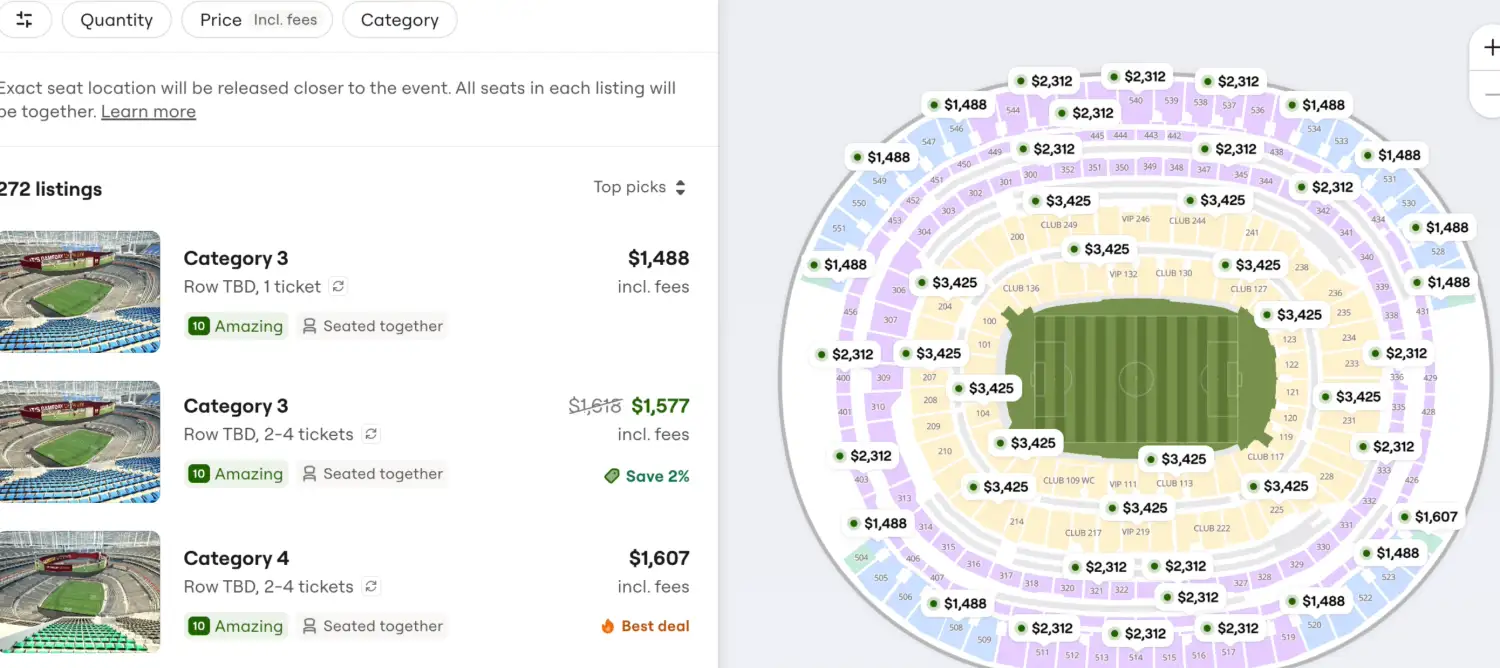
When you click into a listing, the map zooms to the category chunk you’re buying in, so you get a realistic sense of which side of the stadium and what kind of height/angle to expect, even if the exact row is still TBD.
You’ll see that “TBD” language when you shop. On SeatGeek, labels like “Row TBD” simply mean FIFA hasn’t assigned the exact row yet—your match and category are already locked in, and tickets bought together will still be seated together once FIFA fills in the final seat details closer to kickoff.
Filtering and comparing across categories
Because every listing carries a category tag, you can use SeatGeek’s tools to:
Filter by Category 1-4 to quickly see options at your preferred level
Use interactive maps and pricing to compare categories side by side, asking things like “Is the jump from Category 3 to Category 2 worth it in this stadium?” or “How much more is Category 1 compared to Category 2 for this knockout match?”
That’s especially helpful because FIFA’s own category boundaries can shift a bit from stadium to stadium, and even from match to match. SeatGeek mirrors the official maps so you’re seeing category locations as FIFA defines them, not as a rough guess.
How to decide which World Cup 2026 category is right for you
If you’re trying to make a fast decision, think in terms of view vs. budget vs. atmosphere:
Pick Category 1 if:
You want the best view available and are willing to pay for it
You care most about following the tactics and every touch up close
Pick Category 2 if:
You want a strong view without paying top tier
You’re happy with slightly more corner or more elevation in trade for savings
Pick Category 3 if:
You’re focused on the experience and atmosphere and want to keep costs more manageable
You actually like a more elevated, wide-angle view of the match
Pick Category 4 if:
You mainly just want to be in the stadium and are chasing the lowest possible price
You understand these seats will be the highest and farthest in the building, and availability may be limited
However you choose, the process will look the same:
Pick your 2026 World Cup match and category on SeatGeek
Complete your purchase and watch for your FIFA Ticket Confirmation
Download the World Cup 26 app or use FIFA.com/tickets to accept your tickets
Expect to see your exact seat number and barcode in the days (or hours) before kickoff
Understanding how categories work and how SeatGeek’s maps and filters line up with them will take a lot of the mystery (and stress) out of buying World Cup tickets. Instead of guessing where you might end up, you can shop confidently within a category that matches your budget, your preferred view, and how you want to experience one of the biggest tournaments in sports.
📁 Categories: World Cup
🏷️ Tags: World Cup 2026